


TruHearing App
2.91.86K Reviews
App Specs
- Version
- 2.8.0.16337
- Updated On
- License
- Free
- Downloads
- 100,000+
- Developer
- Sivantos Pte. Ltd.
- Categories
- Medical
- Platform
- Android
Screenshots
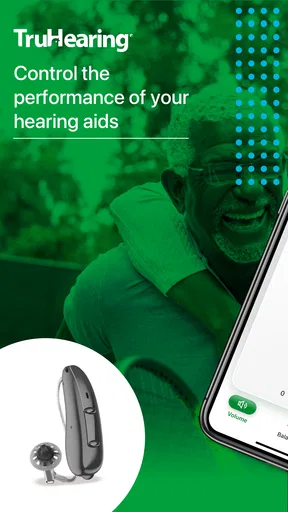
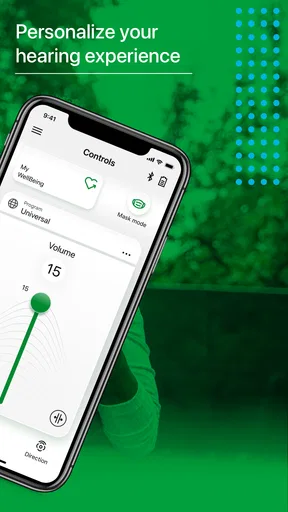
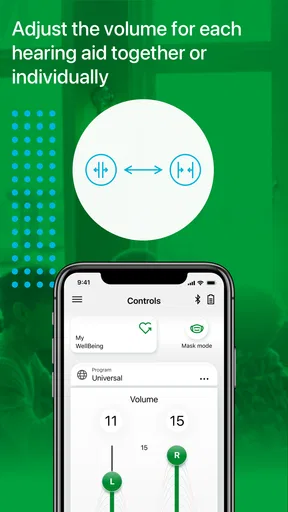
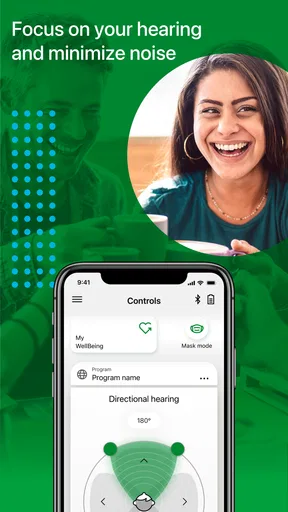
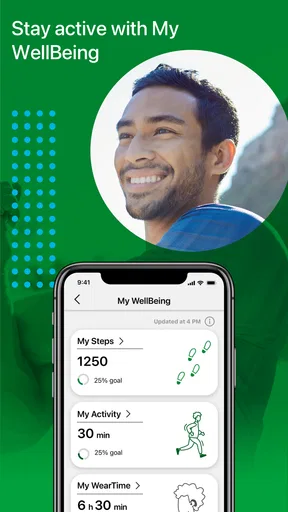
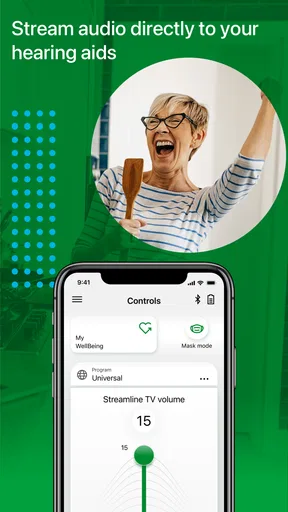
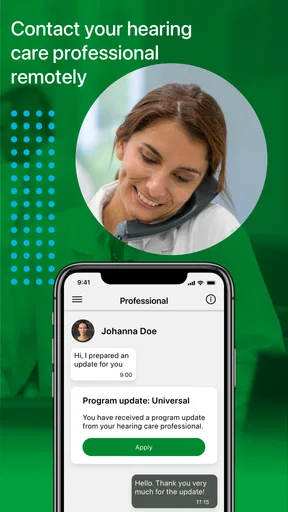
 Analysis by AppCompare
I approached TruHearing App as a practical companion for hearing-aid users rather than as a general medical information tool. That distinction matters. Its value is tied to the daily experience of wearing compatible hearing aids, checking their status, and making small adjustments without reaching for another device. In my experience, the app makes the most sense when it is treated as part of a hearing routine, not as a replacement for professional care.
Developed by Sivantos Pte. Ltd., this free medical app is aimed at an Everyone audience and runs on Android devices using version 10 or later. It has passed the early-adoption stage, with over 100 thousand installs, although its average rating sits at 2.9 from around 3.4 thousand ratings and about 1.9 thousand written reviews. That mixed reception gives a useful warning: the idea is appealing, but the quality of the experience can depend heavily on the user's hearing aids, phone, and expectations.
What the app is really useful for in everyday hearing-aid use
The strongest case for this app is convenience. Hearing aids are easy to forget when everything is working, but the moment sound feels too quiet, a conversation becomes tiring, or one side seems different from the other, having a control point on a phone is helpful. Instead of treating the hearing aids as a completely separate device, the app gives the user a more familiar way to interact with them.
I find that especially useful during transitions between environments. A quiet kitchen, a busy café, a family gathering, and an outdoor walk can place very different demands on hearing. Even without making dramatic changes, being able to check the hearing-aid experience from the phone can make the process feel less mysterious. That reassurance is valuable for someone who is still learning what normal operation feels like.
The app also fits a simple troubleshooting habit. When sound does not seem right, I would first check whether the hearing aids are positioned correctly, whether they are switched on, and whether the phone is communicating with them. Only after those basic checks would I assume there is a medical or hardware problem. Using the app as part of that sequence can prevent unnecessary frustration and helps separate a connection issue from a hearing issue.
One practical tip is to test the setup at home before relying on it in public. Pairing or reconnecting technology while sitting in a noisy restaurant is a poor time to learn how the controls behave. I would spend a few quiet minutes becoming familiar with the app, then repeat the check after putting the phone away and bringing it back. That small rehearsal can make the difference between calmly adjusting the experience and abandoning the app when it matters.
A useful companion, not a diagnosis tool
Because this is categorized as a medical app, some readers may expect hearing tests, diagnostic explanations, or detailed clinical guidance. I would not approach it that way. Its role is much narrower and more practical: helping the user live with hearing aids. It should not be used to decide whether hearing has deteriorated, whether an ear problem is developing, or whether professional attention is unnecessary.
Worth Reading Before You Choose

EA SPORTS FC Mobile 26 Is a Bigger Football Game, but It Takes Time

Flipboard Shows What News Apps Must Do Beyond the Feed

Switching to Android Auto Means Rethinking Your Driving Routine

Google Calendar Makes a Crowded Week Easier to Manage

Ludo King Makes the Most of the Minutes Between Plans

Baby Panda World Brings Quick Play to Modern Phones, but Its Game Library Feels Busy
That boundary is important for family members too. If you are helping a parent or partner, the app may make everyday assistance easier, but it does not turn you into a hearing specialist. A sudden change in hearing, pain, dizziness, persistent distortion, or a hearing aid that repeatedly behaves abnormally deserves appropriate professional attention rather than endless adjustments inside an app.
I also appreciate the difference between control and understanding. An app can make a device easier to operate, but it cannot explain every reason a user struggles in a particular room. Poor acoustics, distance, background noise, fatigue, and the speaker's position can all affect communication. The right response may be a better seating position or a quieter setting, not another change to the hearing aids.
Where the experience can become frustrating
The rating history suggests that this is not a universally smooth experience, and I can understand why a hearing-aid companion would attract uneven feedback. Connectivity-based apps have several points of failure: the phone may not recognize the hearing aids, a connection can drop, or the user may be unsure whether a change came from the app or from the hearing aids themselves. For someone already dealing with hearing difficulty, that uncertainty feels more serious than a minor inconvenience in an ordinary utility app.
The app also asks users to accept a certain amount of technical patience. A person who wants a simple physical control and no phone involvement may find the extra layer unnecessary. Phones differ in their wireless behavior, battery condition, operating-system settings, and background restrictions. Even when the app itself is well designed, the complete experience includes all of those variables.
That is why I would not recommend making the app the only way to manage hearing aids. Keep the basic physical controls familiar, and learn what the hearing aids do when the phone is unavailable. This is a meaningful trade-off: the app can be more convenient than manual operation, but dependence on it can become a weakness during a low-battery situation, a disconnected session, or a phone change.
Another limitation is psychological rather than technical. Too many small adjustments can encourage users to chase a perfect sound profile for every room. Hearing is not static, and a setting that feels comfortable in one place may feel wrong somewhere else. I would make one change at a time, listen for a few minutes, and avoid repeatedly altering settings just because the first result is unfamiliar. A stable routine is often more useful than constant experimentation.
How I would use it during a normal day
Imagine starting the morning at home, then taking a bus to work and meeting a colleague in a crowded café. I would begin by checking that the hearing aids are connected before leaving, rather than waiting until conversation becomes difficult. On the bus, I would avoid making frequent adjustments simply because the environment is loud. In the café, I would first move closer to the speaker and face them directly. Only if the hearing experience still felt unsuitable would I use the app as part of the next step.
That workflow keeps the app in its proper place. It is a support tool, not an automatic answer to every listening problem. The most useful habit is to combine it with ordinary communication strategies: choosing a better seat, reducing distance, asking people to speak clearly, and taking a short break when listening becomes tiring. The app can support those decisions, but it cannot replace them.
For a family member assisting remotely or in person, the app may also provide a shared reference point during basic troubleshooting. Instead of asking vague questions such as “Are the hearing aids working?”, you can work through a more concrete sequence: are they on, are they connected, and does the user notice any change after a simple adjustment? This does not solve every problem, but it makes conversations less confusing.
I would also recommend keeping the phone's battery in mind. Hearing-aid users often depend on their phones for communication, navigation, and emergency contact, so using the phone as a control surface adds another reason to avoid running it nearly empty. The app is free, which removes a purchase barrier, but free access does not eliminate the practical cost of maintaining a reliable phone-and-hearing-aid routine.
Who is likely to appreciate it most
The best audience is someone who already uses compatible hearing aids and wants a phone-based companion for ordinary management. It should appeal to users who are comfortable with smartphones, prefer adjusting devices through a screen, and want more independence in daily situations. It can be particularly reassuring for a new wearer who is still learning how hearing aids fit into work, travel, and social life.
It may also suit an experienced wearer who dislikes relying on tiny controls. A phone interface is often easier to see and understand than a small button, especially when the user is already juggling conversation, movement, or limited dexterity. The benefit is not merely technical; it can reduce the feeling that hearing aids are complicated objects that require specialist attention every time something feels different.
I would be more cautious about recommending it to someone who wants a universal hearing solution. The name and purpose point toward TruHearing-related hearing-aid use, so a person with unrelated earbuds, a different hearing device, or no hearing aids at all should not download it expecting a general hearing-enhancement tool. Likewise, someone looking for hearing screening, tinnitus education, or a replacement for an audiologist is choosing the wrong category of app.
It is also not the obvious choice for a user who strongly prefers non-digital controls. If your priority is reliability with the fewest possible steps, the hearing aids' own controls or guidance from a hearing professional may be a better fit. The app's convenience is real, but only when the user is willing to include a smartphone in the routine.
How it compares with the usual alternatives
The closest alternative is simply operating the hearing aids directly. Manual controls have a major advantage: they do not require a phone, a screen, or a connection. They are dependable when the user has learned them, and they remain available when the phone is charging or misplaced. Their drawback is that small controls can be difficult to see, remember, or use discreetly.
Professional support is the stronger alternative when the problem is persistent or unclear. An audiologist can investigate fit, comfort, hearing changes, and device behavior in a way an app cannot. That route takes more time and may feel less convenient, but it is the right choice when repeated adjustments are not solving the problem. I see TruHearing App as sitting between manual operation and professional care: more accessible than an appointment for a minor daily change, but far less capable than clinical guidance.
General sound-amplification or listening apps are different again. They may be aimed at people without hearing aids or may process sound through the phone itself. That can be useful for a different audience, but it does not make them a direct substitute here. A hearing-aid companion is most valuable when it works with the user's existing hearing routine rather than asking the phone to become the hearing device.
The practical comparison comes down to control versus simplicity. This app offers a more modern, phone-centered way to manage hearing aids, while manual controls offer fewer moving parts. Professional care offers deeper answers, while the app offers quicker everyday access. I would choose among them based on the problem in front of me rather than assuming one option should handle everything.
Details worth knowing before installing
The current release is version 2.8.0.16337, and the app was released on July 20, 2020. Those details are useful when checking compatibility or explaining the app to a family member, but they should not be mistaken for a promise that every phone and hearing-aid combination will behave identically. The operating-system requirement is Android 10 or later, so an older Android phone may not be suitable.
Since the app is free, trying it does not require a purchase decision. I would still approach installation with a clear goal: do you want easier day-to-day control, help with basic connection checks, or a way to feel more independent with your hearing aids? A specific goal makes it easier to judge whether the app is helping instead of treating every unfamiliar behavior as a reason to keep changing settings.
Before depending on it, I would confirm that the phone is running a supported Android version, keep the hearing aids close during setup, and test the connection in a quiet place. I would then repeat the test after moving around the home. That second check is useful because a setup that appears fine on a table may feel different when the phone is in a pocket or another room.
If the app does not behave as expected, I would avoid immediately assuming the hearing aids are defective. Start with the simplest explanation: the phone may need a fresh connection, the devices may not be active, or the user may be trying to control a function that is not available in the current setup. If the same issue keeps returning, that is the point to seek device-specific help rather than spending an evening repeatedly reinstalling or adjusting things.
My final recommendation
TruHearing App is a sensible companion for the right hearing-aid user, but it is not a complete hearing solution. I like its central idea: put everyday hearing-aid support somewhere familiar and accessible, so the user can participate more actively in managing daily listening. The free price and Everyone age rating make it easy to consider, while the Android 10 minimum keeps compatibility worth checking before installation.
My reservation is that convenience can turn into friction when connectivity or device compatibility is uncertain. The average rating of 2.9 is a reminder to keep expectations realistic, especially if you need flawless operation without troubleshooting. I would not install it expecting a diagnostic tool, a universal amplifier, or a replacement for physical controls and professional care.
My recommendation is specific: try it if you already use the relevant hearing aids, feel comfortable with Android, and want a more convenient daily control option. Give it a quiet test, learn the basic workflow, and keep a manual backup routine. If that combination works for you, the app can make hearing-aid ownership feel less cumbersome. If you want a standalone hearing solution or dislike phone-dependent accessories, the usual alternatives will probably serve you better.
Pros
- Quick access to hearing-aid support and account information
- Helps users locate participating hearing-care providers
- Useful resources for understanding hearing health and devices
- Can simplify communication with TruHearing customer support
- Convenient for checking benefits and hearing-care eligibility
Cons
- Features may be limited for users without a TruHearing plan
- Some actions may redirect you to a provider or external website
- Account details may take time to update after plan changes
- Not all hearing-aid brands or services may be supported
- App usefulness depends on availability in your region
FAQs for TruHearing App
What is the TruHearing app used for?
The TruHearing app is designed to help eligible users manage their hearing-care benefits and connect with hearing-related services. Depending on the available plan and region, it may help users find participating providers, review benefit information, arrange appointments, access support, and manage details related to hearing aids. The exact features can vary according to your insurance coverage and TruHearing program eligibility.
Can anyone use the TruHearing app, or is eligibility required?
The app is primarily intended for people who receive TruHearing services or have access through a participating health plan, employer, or insurance benefit. You may be asked to verify your identity, coverage, or member information before using certain features. Downloading the application does not necessarily mean that all services will be available, so checking your eligibility beforehand is recommended.
Can I use the app to find a hearing-care provider or schedule an appointment?
In supported plans and locations, the TruHearing app can help users locate participating hearing professionals and begin the process of arranging care. Available appointment options depend on provider schedules, your benefit network, and local availability. Some users may still need to contact the provider directly or complete additional verification before an appointment or hearing-aid consultation is confirmed.
Does the TruHearing app let me order or manage hearing aids?
The app may provide access to information and support related to hearing aids, but its ordering and management capabilities can depend on your plan, provider, and device. It should not be assumed that every hearing aid can be purchased, adjusted, or monitored entirely through the app. For repairs, replacements, technical problems, or device-specific adjustments, you may need assistance from a participating provider.
Is the TruHearing app free, and what should I know about privacy?
The TruHearing app is generally available to download without a separate app purchase, although hearing services, devices, appointments, or other benefits may involve eligibility rules, copayments, deductibles, or plan-specific costs. Because the app may handle personal, insurance, and health-related information, review its privacy policy and requested permissions carefully. Use a secure connection and keep your login details private.


